Thursday, 14 July 2011

What makes an entrepreneur???

What makes an entrepreneur???

If this is the question my answer would be “just an idea” and if to elaborate, it’s the circumstances, availability of resources, and a thinking mind ‘that’s it’ and that’s feasible too. So if this click of thought has such a power than next obvious question will be how to get it?? And this is how the whole journey starts.

Someone can point that India’s population is its biggest problem today. But for an entrepreneur it is more of an opportunity than a problem ‘coz more population means more customers means more revenue. On the other side more population more supply of manpower means cheap resources.

Of course, a desired set of skills also plays a very critical role. One can acquire these skills with higher education or experience or both. But more important is that mind set up to utilization of these skills where it requires the most. There can be two people with similar set of skills, one entrepreneur other not, depending on the fact that how they utilized their skills. For example:

“A shoemaker once decided to visit a country in Africa to check its potential as a market for shoe. He was shocked to know that there no body used to wear shoes. He returned back with disappointment and conclusion that the potentially it’s dead as a shoe market.
Another shoemaker visited the same country with same notion. He jumped with joy after knowing that nobody wears shoes there, with the idea that if he can make these people to wear shoes it can prove a huge market for his business.”

And here lies the actual difference, in spite of similar skills only one is clear winner by his ideas.


 It is very important to mention that the implementation of the idea is very critical.  Ideas are very short lived and more they are just thought upon, easier they spawn disbeliefs causing the death of idea. However, it takes maximum courage and self belief to implement the idea but only this separates one from the rest.

Dinesh Kumar

Pictures: Google


Tuesday, 28 June 2011

Learn Mail-Merge, Great MS Office Tool

E-mails are very important mode of documented communication in today’s world, and due to the upcoming trends multiple mails need to be sent to the clients.

This is very tiring and time consuming process if done individually.

The solution for this problem is using Mail-merge which is the MS office tool to send multiple mails in one go.

Following is a step wise presentation to use this tool to get your mailing done efficiently.


Step 1:

Collate a list of recipients on a excel sheet and save it.


Step 2: Draft your requisite communication on a word document.


Step 3:
Go to Mailing, Start Mail Merge, choose start step wise Mail Merge Wizard which will start a Six step process.


Step 4:On right side, click on E-mail messages in select documents, then on next.


Step 5:In Select start document click on use current document, and then click Next.


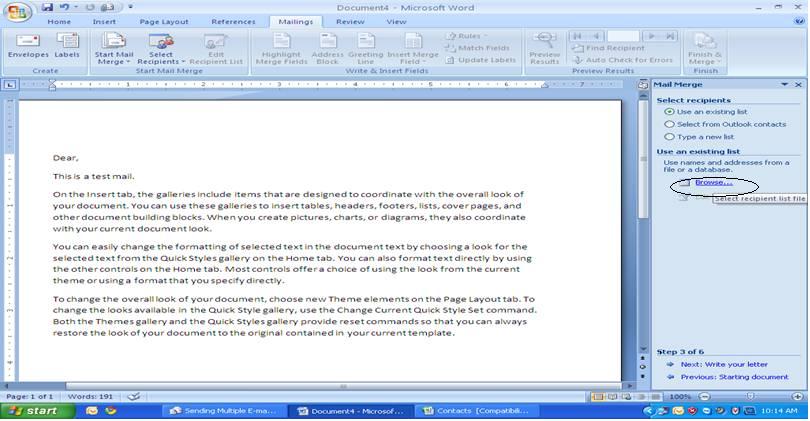
Step 6:    In select recipients, click on use an existing list, and then click on browse.


  •      Choose the excel sheet of recipients saved earlier and open it.


  • ·         Select the sheet by clicking OK.

 
  •     Click on Ok to select list.


  •       And then click on Next.


Step 7:
In write your letter click on Address block and Click Ok in Popped up window after selecting the recipient format, and then click on Next.


Step 8:
Check the mail to be sent in preview your letters, and click on Next.


Step 9:
Simply click on Electronic Mail, a window will pop up asking for the fields like To, Subject line. Select Email ID for “To” and Type the subject in “Subject line” and Click Ok.                              


By clicking on Ok your mails are sent to recipient.

Enjoy E-Mailing!!!!

Regards,


Dinesh kumar


(Title suggested by: Sumit Saxena, Arshi)