Friday, 11 January 2013

The Cleaners

Tring.. Tring..
“Hello! It’s Sin Scene Sanitizers, How may I help you?”
“Ma’am, we need your services.”
“What is it about?”
“Serious accident, bus crushed a girl and body is in bad shape.” 
“Oh, ok please tell me the address and your identity; we will reach there soon.”
 
Beep Beep
Text Massage: [Assign No. 10502, Road Accident, Female 28, MG Road, near Dhaula Kuan flyover, towards Gurgaon. GPS Parameters ###############.]

Hey Ajay, we have an assignment. Let’s Go!

Hi, I am sure by now you must be having an impression of we being some ambulance services, but this was the mistake that I also did while applying for this job. Let me give you a quick intro: I am Rishi Srivastava, Executive (Sanitizer and Bio-Hazards Mover), S3 Pvt. Ltd. As my designation suggest I am in cleaning business, cleaning and moving of dead remains of human being from crime and accident scenes. Seems easy? Think again; we work for Police, NGO’s and individuals who had some tragic accident cases (suicide, road & rail accident, murder) in their family and the bio-remains of deceased relative is in such a bad outline that even Police is shying away to touch it. Our work is to sanitize this scene by removing all the bio-remains, cleaning the blood stains, sterilizing the place against pathogens of body fluids, helping police in searching evidences, and at times counseling the victim’s family too. And yes, we charge heavily and claim our bills from Insurance companies, NGOs, Hospitals, Police department and individuals. So, you can say that we are called when there is no use of calling an ambulance.
 
While we are on our way for today’s assignment let me tell what it takes to be a S3 sanitizer. Practically speaking a very strong stomach (you can’t throw-up, no matter how odious the scene is) and emotionally very strong mind set, for everything else you will be given training. Right then, we are now riding our 220 cc bike in our bio-hazard suits with two heavy bags (not like our company can afford only this for our conveyance, but it’s convenient to reach the sites in Delhi traffic). Ajay is driving and I am on pillion, just ignoring the gazing eyes of passers as if we are some aliens from other planet (I hate my suit). By the way, my partner is Ajay Powar, a cool dude, putting up in a PG, final year correspondence student, working just for pocket money, with “work hard and party harder” motto of life; anybody would like to live like him only if his current profession is excluded.
“Ajay, I think we should take this right it’s a shortcut” I said almost shouting as it’s difficult to hear in helmets. No, the traffic would be heavy this way- he replied and pulled accelerator furiously. I tightened my grip and asked “Isn’t Pooja’s office near to our site?” he turned his head and smiled, though I could hardly see it coz of the helmet. So, what have you decided finally? - My next question. He kept mum and increased the speed further more. Actually, Pooja and Ajay are in a relationship for almost two years now but ever since she came to know about his job she is rigorously asking him to switch, which is a common peer pressure on people in this profession, as relatives find this job a taboo.“Why don’t you speak to her?” I asked just to kill the time. “I need money, can’t quit right now and I asked her for six months time, we’ll be fine” he replied more to convince himself than me.
 
Meanwhile, we reached the venue. While, he parked the bike, I tried to acclimatize with the trauma on the faces of the people gathered around and rushed to the center of human circle. There was blood and human flesh all over the road. I could easily distinguish the culprit bus as this white line bus was parked in middle of road with no driver around, while putting a caution line separating the public and blood stained road. “Are you from S3?” one of the two constables who were trying to control the public and traffic asked as I put my bag down and opened to put my globs on. “Yes, I replied and sprayed anti-pathogen on blood pool on road. “I called up, she died on the spot and the body is moved to Safdarjung seconds before” he informed me. I understood where we have to send our bills.
 
I noticed something glittering near the divider rails. I moved and picked, it was a bracelet half stained in blood and something written on it but very difficult to read because of dried blood patch, also found a money purse between the rails. It was easy to make out whom these belong to. I stretched my hand without looking at Ajay and forwarded items towards him to put them in a bag so that can be handed over to the victim’s kin. He did so and hurried to pick up all pieces of flesh and internal body parts from the pool of blood on road in a vacuum poly bag. I finished spay work all around and started mopping the road from the place Ajay has finished his anthology work. The mob has reduced and traffic started crawling by now as we continued.
 
“After finishing this you should go and meet Pooja, her office is very near” I said and started scrubbing dried blood from the divider rails, on which he nodded without even looking at me. Now, it can be horrifying scene for you but this is routine work for us, so we pretend to be calm and discuss other issues while working, it helps us reduce the trauma. Generally it is Ajay who does maximum talking but today as I know his last date was more of a suffering, so I took the challenge to divert our minds from heinous smell and vista. “I think this girl was beautiful” I murmured with a smile pointing towards a bunch of hairs struck in the divider railing with some skin also. He looked at me with some serious expressions and turned to give a final blow of mop. I thought it’s better to keep mum, realizing how bad my sense of humor is.

We finished the task, collected all our tools and packed rather silently as my partner is not in a good mood today. While moving towards our vehicle I thought to remind him once again to meet Pooja and said “Just remove your  bio-suit and you are all set for a date now.” He kept moving silently till we reached near our vehicle. While starting the bike he looked in to my eyes, which I could notice, were red as if he could not sleep at all last night, with a deep breath he opened his fist and said “I need not to quit now” and I could just saw the same bracelet, Ajay (heart) Pooja was clear to read on it now.


(It's entirly a work of fiction and resemblance to any live or dead is just a co-incidence)

Thursday, 15 March 2012

A Daily Passenger's Dilemma

It’s rather a usual Monday morning with billions of humans using public transports and millions others in private vehicles on the road crawling towards the concrete cum glass jungles, the place they call their offices. Delhi is no exception from other metro cities in India; the only difference is that it has now got a special mode of transport called Metro Rail. But mind you, only the mode has changed here not the mentality of people who are habitual to the blue lines, earlier “life line of Delhi” (or end of life line of Delhi, LOL). It’s still the same rat race for seats and overcrowded to the extent that you can even smell what the person next to you has had in breakfast (or in dinner). 
I am lucky enough to get a seat today which was just next to the seat reserved for the elderly people. Now reservation in India is a common phenomenon these days, you can find reservation for maximum categories and those not having are fighting for it. They should now start calling it world’s largest reservation country instead of largest democracy. Ok, the reserved seat next to me was occupied by a good looking, and I suppose, college going girl (wow, I am really lucky today) with emotionless face.  I said good looking, coz a pair of blue jeans from Levis, a light yellow top “Guess” written on front side, a pair of shoes from Addidas and dark black goggles (oddly large for her face) can make anybody, good looking. (Sometimes I wonder why they don’t announce “jeans” as the national dress for girls in India, officially). Such was the charisma of this girl, I hardly noticed, a lady, probably in mid 40’s of age, extraordinarily glowing face for that age with a spring smile, sparkling eyes,  well dressed in blue sari and caring a black leather personal bag, boarded the Metro and came as close, to my seat, as she could. She didn’t ask the girl next to me for the seat as it was reserved for elderly people, perhaps she was shy to call herself elderly.
 Suddenly, I realized that the “good looking” next to me was gazing at me from behind her dark black goggles with very dirty looks as if ordering “can’t you see, a lady is standing?” “Vacant the seat”.  My heart started pounding “should I offer my seat to her?” but then I thought “why me?” being a daily commuter I know it’s really very difficult to get a seat in Metro and nobody would let it go easily. Also, she is seating on the seat reserved for elderly, she should vacant seat for her. I firmly decided not to leave my seat.
Meanwhile, the lady kept her glow and smile on her face intact and the crowd kept building up with each passing station. The auto announcement system in metro proclaimed “Next station is Rajiv Chauk, the doors will open on the right” and a current of electricity ran through, otherwise effigy like crowd. The “good looking” without raising her face whispered “is this Rajiv Chauk next?” as if asking to herself only. I replied “yes” loudly. The lady standing near to us moved a bit towards her and said “Yes, Beta! You want to get down here”. The girl nodded her head in reply.
To my surprise, the girl put one of her hands on to my thigh as if helping herself to stand up and with other hand started searching something on the other side. The lady lean forward at once and picked a white hollow stick with nodes, which was folded several times with the help a elastic band throw its hollow, and said “here it is” while handing it to her, my eyes spread wide.
The “good looking” unfolded the stick in one hand and kept the other hand in air in search of the exit door for Metro, now even my mouth wide open in shock, and the lady helped her to exit before taking the seat next to me. 
For next few moments I felt like frozen, (I think, skipped several heartbeats too) my brain stopped thinking and just kept watching her from glass pane of Metro. The lady, now sitting next to me, was still caring the same glow and smile on her face. 

Disclaimer: This short story has nothing to do with any alive or dead, it's just a work of my imagination.

Thursday, 14 July 2011

What makes an entrepreneur???

What makes an entrepreneur???

If this is the question my answer would be “just an idea” and if to elaborate, it’s the circumstances, availability of resources, and a thinking mind ‘that’s it’ and that’s feasible too. So if this click of thought has such a power than next obvious question will be how to get it?? And this is how the whole journey starts.

Someone can point that India’s population is its biggest problem today. But for an entrepreneur it is more of an opportunity than a problem ‘coz more population means more customers means more revenue. On the other side more population more supply of manpower means cheap resources.

Of course, a desired set of skills also plays a very critical role. One can acquire these skills with higher education or experience or both. But more important is that mind set up to utilization of these skills where it requires the most. There can be two people with similar set of skills, one entrepreneur other not, depending on the fact that how they utilized their skills. For example:

“A shoemaker once decided to visit a country in Africa to check its potential as a market for shoe. He was shocked to know that there no body used to wear shoes. He returned back with disappointment and conclusion that the potentially it’s dead as a shoe market.
Another shoemaker visited the same country with same notion. He jumped with joy after knowing that nobody wears shoes there, with the idea that if he can make these people to wear shoes it can prove a huge market for his business.”

And here lies the actual difference, in spite of similar skills only one is clear winner by his ideas.


 It is very important to mention that the implementation of the idea is very critical.  Ideas are very short lived and more they are just thought upon, easier they spawn disbeliefs causing the death of idea. However, it takes maximum courage and self belief to implement the idea but only this separates one from the rest.

Dinesh Kumar

Pictures: Google


Tuesday, 28 June 2011

Learn Mail-Merge, Great MS Office Tool

E-mails are very important mode of documented communication in today’s world, and due to the upcoming trends multiple mails need to be sent to the clients.

This is very tiring and time consuming process if done individually.

The solution for this problem is using Mail-merge which is the MS office tool to send multiple mails in one go.

Following is a step wise presentation to use this tool to get your mailing done efficiently.


Step 1:

Collate a list of recipients on a excel sheet and save it.


Step 2: Draft your requisite communication on a word document.


Step 3:
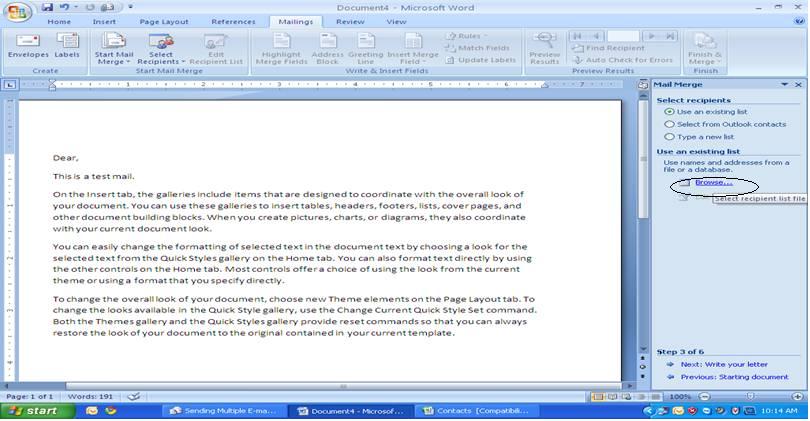
Go to Mailing, Start Mail Merge, choose start step wise Mail Merge Wizard which will start a Six step process.


Step 4:On right side, click on E-mail messages in select documents, then on next.


Step 5:In Select start document click on use current document, and then click Next.


Step 6:    In select recipients, click on use an existing list, and then click on browse.


  •      Choose the excel sheet of recipients saved earlier and open it.


  • ·         Select the sheet by clicking OK.

 
  •     Click on Ok to select list.


  •       And then click on Next.


Step 7:
In write your letter click on Address block and Click Ok in Popped up window after selecting the recipient format, and then click on Next.


Step 8:
Check the mail to be sent in preview your letters, and click on Next.


Step 9:
Simply click on Electronic Mail, a window will pop up asking for the fields like To, Subject line. Select Email ID for “To” and Type the subject in “Subject line” and Click Ok.                              


By clicking on Ok your mails are sent to recipient.

Enjoy E-Mailing!!!!

Regards,


Dinesh kumar


(Title suggested by: Sumit Saxena, Arshi)

Thursday, 9 June 2011

Keyboard Shortcuts: May Cut Short Workload


The world is going tech savvy up to new heights every day and the base of this technological revolution undoubtedly is Computer. The increasing use of this gadget in our daily life has not only changed the pace of life but also the standards of living. An in-depth knowledge of shortcut keys of windows (which is the widely used around the world) can be an added dimension to this pace.
So friends, here I am again (with the help of Microsoft’s online information) up with some (almost all available) Shortcuts:


General keyboard shortcuts
  • CTRL+C (Copy)
  • CTRL+X (Cut)
  • CTRL+V (Paste)
  • CTRL+Z (Undo)
  • DELETE (Delete)
  • SHIFT+DELETE (Delete the selected item permanently without placing the item in the Recycle Bin)
  • CTRL while dragging an item (Copy the selected item)
  • CTRL+SHIFT while dragging an item (Create a shortcut to the selected item)
  • F2 key (Rename the selected item)
  • CTRL+RIGHT ARROW (Move the insertion point to the beginning of the next word)
  • CTRL+LEFT ARROW (Move the insertion point to the beginning of the previous word)
  • CTRL+DOWN ARROW (Move the insertion point to the beginning of the next paragraph)
  • CTRL+UP ARROW (Move the insertion point to the beginning of the previous paragraph)
  • CTRL+SHIFT with any of the arrow keys (Highlight a block of text)
  • SHIFT with any of the arrow keys (Select more than one item in a window or on the desktop, or select text in a document)
  • CTRL+A (Select all)
  • F3 key (Search for a file or a folder)
  • ALT+ENTER (View the properties for the selected item)
  • ALT+F4 (Close the active item, or quit the active program)
  • ALT+ENTER (Display the properties of the selected object)
  • ALT+SPACEBAR (Open the shortcut menu for the active window)
  • CTRL+F4 (Close the active document in programs that enable you to have multiple documents open simultaneously)
  • ALT+TAB (Switch between the open items)
  • ALT+ESC (Cycle through items in the order that they had been opened)
  • F6 key (Cycle through the screen elements in a window or on the desktop)
  • F4 key (Display the Address bar list in My Computer or Windows Explorer)
  • SHIFT+F10 (Display the shortcut menu for the selected item)
  • ALT+SPACEBAR (Display the System menu for the active window)
  • CTRL+ESC (Display the Start menu)
  • ALT+Underlined letter in a menu name (Display the corresponding menu)
  • Underlined letter in a command name on an open menu (Perform the corresponding command)
  • F10 key (Activate the menu bar in the active program)
  • RIGHT ARROW (Open the next menu to the right, or open a submenu)
  • LEFT ARROW (Open the next menu to the left, or close a submenu)
  • F5 key (Update the active window)
  • BACKSPACE (View the folder one level up in My Computer or Windows Explorer)
  • ESC (Cancel the current task)
  • SHIFT when you insert a CD-ROM into the CD-ROM drive (Prevent the CD-ROM from automatically playing)
  • CTRL+SHIFT+ESC (Open Task Manager)
Dialog box keyboard shortcuts
If you press SHIFT+F8 in extended selection list boxes, you enable extended selection mode. In this mode, you can use an arrow key to move a cursor without changing the selection. You can press CTRL+SPACEBAR or SHIFT+SPACEBAR to adjust the selection. To cancel extended selection mode, press SHIFT+F8 again. Extended selection mode cancels itself when you move the focus to another control.
  • CTRL+TAB (Move forward through the tabs)
  • CTRL+SHIFT+TAB (Move backward through the tabs)
  • TAB (Move forward through the options)
  • SHIFT+TAB (Move backward through the options)
  • ALT+Underlined letter (Perform the corresponding command or select the corresponding option)
  • ENTER (Perform the command for the active option or button)
  • SPACEBAR (Select or clear the check box if the active option is a check box)
  • Arrow keys (Select a button if the active option is a group of option buttons)
  • F1 key (Display Help)
  • F4 key (Display the items in the active list)
  • BACKSPACE (Open a folder one level up if a folder is selected in the Save As or Opendialog box)
Microsoft natural keyboard shortcuts
  • Windows Logo (Display or hide the Start menu)
  • Windows Logo+BREAK (Display the System Properties dialog box)
  • Windows Logo+D (Display the desktop)
  • Windows Logo+M (Minimize all of the windows)
  • Windows Logo+SHIFT+M (Restore the minimized windows)
  • Windows Logo+E (Open My Computer)
  • Windows Logo+F (Search for a file or a folder)
  • CTRL+Windows Logo+F (Search for computers)
  • Windows Logo+F1 (Display Windows Help)
  • Windows Logo+ L (Lock the keyboard)
  • Windows Logo+R (Open the Run dialog box)
  • Windows Logo+U (Open Utility Manager)
Accessibility keyboard shortcuts
  • Right SHIFT for eight seconds (Switch FilterKeys either on or off)
  • Left ALT+left SHIFT+PRINT SCREEN (Switch High Contrast either on or off)
  • Left ALT+left SHIFT+NUM LOCK (Switch the MouseKeys either on or off)
  • SHIFT five times (Switch the StickyKeys either on or off)
  • NUM LOCK for five seconds (Switch the ToggleKeys either on or off)
  • Windows Logo +U (Open Utility Manager)
Windows Explorer keyboard shortcuts
  • END (Display the bottom of the active window)
  • HOME (Display the top of the active window)
  • NUM LOCK+Asterisk sign (*) (Display all of the subfolders that are under the selected folder)
  • NUM LOCK+Plus sign (+) (Display the contents of the selected folder)
  • NUM LOCK+Minus sign (-) (Collapse the selected folder)
  • LEFT ARROW (Collapse the current selection if it is expanded, or select the parent folder)
  • RIGHT ARROW (Display the current selection if it is collapsed, or select the first subfolder)
Shortcut keys for Character Map
After you double-click a character on the grid of characters, you can move through the grid by using the keyboard shortcuts:
  • RIGHT ARROW (Move to the right or to the beginning of the next line)
  • LEFT ARROW (Move to the left or to the end of the previous line)
  • UP ARROW (Move up one row)
  • DOWN ARROW (Move down one row)
  • PAGE UP (Move up one screen at a time)
  • PAGE DOWN (Move down one screen at a time)
  • HOME (Move to the beginning of the line)
  • END (Move to the end of the line)
  • CTRL+HOME (Move to the first character)
  • CTRL+END (Move to the last character)
  • SPACEBAR (Switch between Enlarged and Normal mode when a character is selected)
Microsoft Management Console (MMC) main window keyboard shortcuts
  • CTRL+O (Open a saved console)
  • CTRL+N (Open a new console)
  • CTRL+S (Save the open console)
  • CTRL+M (Add or remove a console item)
  • CTRL+W (Open a new window)
  • F5 key (Update the content of all console windows)
  • ALT+SPACEBAR (Display the MMC window menu)
  • ALT+F4 (Close the console)
  • ALT+A (Display the Action menu)
  • ALT+V (Display the View menu)
  • ALT+F (Display the File menu)
  • ALT+O (Display the Favorites menu)
MMC console window keyboard shortcuts
  • CTRL+P (Print the current page or active pane)
  • ALT+Minus sign (-) (Display the window menu for the active console window)
  • SHIFT+F10 (Display the Action shortcut menu for the selected item)
  • F1 key (Open the Help topic, if any, for the selected item)
  • F5 key (Update the content of all console windows)
  • CTRL+F10 (Maximize the active console window)
  • CTRL+F5 (Restore the active console window)
  • ALT+ENTER (Display the Properties dialog box, if any, for the selected item)
  • F2 key (Rename the selected item)
  • CTRL+F4 (Close the active console window. When a console has only one console window, this shortcut closes the console)
Remote desktop connection navigation
  • CTRL+ALT+END (Open the Microsoft Windows NT Security dialog box)
  • ALT+PAGE UP (Switch between programs from left to right)
  • ALT+PAGE DOWN (Switch between programs from right to left)
  • ALT+INSERT (Cycle through the programs in most recently used order)
  • ALT+HOME (Display the Start menu)
  • CTRL+ALT+BREAK (Switch the client computer between a window and a full screen)
  • ALT+DELETE (Display the Windows menu)
  • CTRL+ALT+Minus sign (-) (Place a snapshot of the entire client window area on the Terminal server clipboard and provide the same functionality as pressing ALT+PRINT SCREEN on a local computer.)
  • CTRL+ALT+Plus sign (+) (Place a snapshot of the active window in the client on the Terminal server clipboard and provide the same functionality as pressing PRINT SCREEN on a local computer.)
Microsoft Internet Explorer navigation
  • CTRL+B (Open the Organize Favorites dialog box)
  • CTRL+E (Open the Search bar)
  • CTRL+F (Start the Find utility)
  • CTRL+H (Open the History bar)
  • CTRL+I (Open the Favorites bar)
  • CTRL+L (Open the Open dialog box)
  • CTRL+N (Start another instance of the browser with the same Web address)
  • CTRL+O (Open the Open dialog box, the same as CTRL+L)
  • CTRL+P (Open the Print dialog box)
  • CTRL+R (Update the current Web page)
  • CTRL+W (Close the current window)
Other information
  • Some keyboard shortcuts may not work if StickyKeys is turned on in Accessibility Options.
  • Some of the Terminal Services client shortcuts that are similar to the shortcuts in Remote Desktop Sharing are not available when you use Remote Assistance in Windows XP Home Edition.
Courtesy: http://www.microsoft.com/enable